


I’ve used AI coding tools for everything from debugging small errors to working through larger development tasks, and one thing has become obvious in 2026: an AI code assistant is no longer just autocomplete.
Today’s tools can read a project, modify multiple files, run commands, write tests and sometimes work through an entire task with surprisingly little guidance. That sounds great until the tool confidently makes a change that looks correct but breaks something somewhere else.
That’s why I don’t think the question is simply “Which AI code assistant is the best?”
The better question is: which one works best for the way you actually develop software?
In this guide, we’ll look at the major AI coding assistants available in 2026, compare how they approach development work, and focus on something that marketing pages don’t always show — where these tools genuinely save time and where you still need to take control.
Table of Contents
What Is an AI Code Assistant?
An AI code assistant is a development tool that uses artificial intelligence to help you write, understand, modify, and troubleshoot software.
The first generation of these tools was mostly about autocomplete. You started typing a function, and the AI suggested the next few lines. That’s still useful, but modern AI code assistants can do much more.
They can understand larger parts of a project, explain unfamiliar code, suggest fixes, write tests, help investigate errors, and—increasingly—carry out multi-step development tasks.
That changes how developers use them. Instead of asking an AI to write one function at a time, you can give it a broader task such as fixing a bug, adding a feature, or refactoring part of an application.
But there’s an important catch: AI-generated code still needs to be reviewed. An assistant can produce code that looks perfectly reasonable while introducing bugs, unnecessary complexity, or security problems.
So I don’t think an AI code assistant should be treated as a replacement for a developer. The more useful way to look at it is as a development partner that can handle some of the repetitive work while the developer remains responsible for the final result.
How AI Code Assistants Have Changed in 2026
The biggest change is the move from code suggestions to task-based development.
A few years ago, the typical workflow was simple: ask the AI a question, copy the generated code into your project, test it, and repeat.
Today’s tools can work with much more context. Depending on the product, they can inspect a repository, work across multiple files, run commands or tests, and make several changes as they work toward a goal.
That’s why we’re seeing more discussion around AI coding agents rather than just AI autocomplete.
The AI Code Assistants We’re Comparing
In this comparison, I’ll look at three widely used AI coding tools: Cursor, Claude Code, and OpenAI Codex. Rather than simply listing features, I’ll focus on how they fit into real development workflows, where each tool performs well, and where you may still want to take control yourself.”
How We Compared These AI Code Assistants
Comparing AI coding tools isn’t as simple as counting features. A tool might be excellent at generating code but frustrating to use on a large project, while another might be better at understanding an existing codebase.
For this comparison, I’m looking at a few things that actually matter during development: how well each tool understands project context, how useful its coding and debugging assistance is, how it handles larger tasks, how much control it gives the developer, and how easily it fits into an existing workflow.
I’m also looking beyond the marketing claims. Features are useful, but the real question is whether they save time without creating more work during review and debugging.
1. Cursor
Cursor was one of the tools that made me rethink what an editor could actually do. Instead of treating AI as a small feature sitting beside the code, Cursor puts it much closer to the center of the development workflow.
What Cursor Does Well
One of Cursor’s biggest strengths is how closely the AI is integrated with the editor. You don’t have to constantly move between your code and a separate chatbot. The assistant can work with the project you’re already looking at, which makes it much easier to ask questions about existing code or make changes across multiple files.
The codebase context is particularly useful when you’re working on a project that has grown beyond a few files. Instead of explaining the structure of the application every time, Cursor can index and search the codebase to help the agent understand where relevant code lives. Cursor currently describes this as complete codebase understanding, including fast codebase search for large projects.
The other major advantage is its move toward agent-based development. Cursor’s Agent can take a larger task, work through multiple files, use tools, and make changes that you can review afterwards. Its current product also supports running agents from the CLI and handing work off to cloud agents.
For me, this is where Cursor becomes more interesting than a traditional autocomplete tool. Asking it to generate a small function is useful, but asking it to investigate a bug, find the relevant files, make a change, and then help test the result is much closer to how developers actually work.
Where Cursor Falls Short
The same level of automation that makes Cursor useful can also make it easy to accept changes too quickly. An agent might modify several files to solve what looks like a simple problem. The final result can appear correct while introducing unnecessary changes somewhere else. That’s why I wouldn’t treat an agent’s “done” message as the end of the task. The diff still needs to be reviewed, and important changes should still be tested.
There’s also a learning curve. If you’re new to AI-assisted development, it can take some time to understand when to use a quick edit, when to ask a question, and when to let the agent handle a larger task. And while Cursor gives you access to multiple models and increasingly autonomous workflows, more capability doesn’t automatically mean better results. For straightforward coding, a simpler interaction can sometimes be faster than giving an agent a large task.
Who Should Use Cursor?
Cursor makes the most sense for developers who spend a lot of time inside an IDE and want AI deeply integrated into their normal workflow.
It’s particularly interesting for people working on existing applications, larger codebases, debugging tasks, and multi-file changes, where understanding the surrounding code matters as much as generating the code itself.
If you mainly want autocomplete and occasional coding suggestions, Cursor may offer more capability than you actually need. But if you want an AI coding assistant that can move from answering questions to actually working through development tasks, Cursor is one of the strongest options to consider in 2026.
Try Cursor → Cursor Official Website
2. Claude Code
Because Claude Code has changed substantially since its original launch, I’ve checked Anthropic’s current material before drafting this. Claude Code now works across terminal and supported IDE workflows and can handle tasks such as reading code, editing files, running tests and commands, while also taking on larger multi-step development tasks. For this comparison, I tested Claude Code through its VS Code integration on the same React Native project used for the other AI coding assistants.

The VS Code integration puts Claude Code directly alongside the development environment, making it possible to work with the project without constantly switching between an editor and a separate terminal window.
What Claude Code Does Well
Claude Code feels quite different from Cursor, even though the two tools can solve many of the same problems. Instead of making the editor itself the center of the experience, Claude Code puts more emphasis on giving the AI a task and letting it work through the codebase.
That difference becomes noticeable when the task involves several files. You can ask Claude Code to investigate a bug, trace where a particular piece of data is being used, make a change across multiple files, or run tests after making the change. It can inspect the project, use command-line tools, and keep working through the task rather than stopping after generating a few lines of code.
I particularly like this approach for debugging and refactoring. Instead of constantly explaining which file to open next, you can describe the problem and let Claude Code investigate the surrounding code first. That doesn’t mean the result should be accepted blindly, but it can remove a lot of the repetitive searching that normally happens before you even start fixing something.
Claude Code is also useful when the problem isn’t immediately obvious. A good example is a bug that appears in one part of an application but is actually caused by configuration, authentication, or a different service elsewhere in the project. Having an assistant that can search through the repository and follow those connections makes this type of investigation much easier.
The important distinction is that Claude Code is not simply a faster autocomplete tool. It is much closer to an AI coding agent that can plan and carry out a development task while giving the developer opportunities to review what it is doing. Anthropic’s current Claude Code workflows also include IDE integrations and background development workflows.
Where Claude Code Falls Short
Giving an AI permission to inspect files, execute commands, and make changes is powerful, but it means you need to pay attention to what it is actually doing. A change that looks reasonable in isolation can still introduce a regression somewhere else in the application. The agent-style approach is also where Claude Code can become frustrating.
Anthropic has also added permission controls and sandboxing because an agent with access to a codebase and command-line tools needs clear boundaries. In other words, the more autonomous the tool becomes, the more important it is to understand what access you are giving it.
There’s also a pricing consideration. Claude Code is included with Anthropic’s Pro and Max plans for individual users, rather than the free plan. That makes it harder to casually try if you only want occasional AI coding help.
There’s another thing worth knowing if you use Claude Code through VS Code: the usage counts toward the same limits shared across Claude and Claude Code. So a long coding session can also reduce the amount of Claude usage available elsewhere on your account.
I also wouldn’t use Claude Code simply because a task can be automated. For a small change that takes two minutes to make manually, setting up an agent and reviewing its work can sometimes take longer than just writing the change yourself.
Who Should Use Claude Code?
Claude Code makes the most sense for developers who regularly work with larger codebases, debugging, refactoring, testing, and multi-file changes. It’s especially interesting if you already spend a lot of time in the terminal and are comfortable reviewing Git diffs and command output. In that environment, Claude Code can feel less like an AI feature added to your editor and more like another developer working alongside you.
If your typical workflow is closer to “write this function for me” or “complete this line of code”, you probably don’t need that much agentic capability. A simpler AI coding assistant may be faster and easier for those tasks. But when the task sounds like “find out why this is broken, work out where the problem is, fix it, run the tests, and show me what changed,” Claude Code becomes much more interesting.
Claude Code and Cursor approach AI-assisted development from slightly different directions. Cursor keeps the developer inside an AI-first editor, while Claude Code puts more emphasis on the agent and the task itself. The next question is how OpenAI Codex compares when the goal is similar: giving an AI more responsibility for actually carrying out development work.
Try Claude → Claude AI
3. OpenAI Codex
OpenAI Codex takes a slightly different approach from both Cursor and Claude Code. Rather than being tied to a particular editor, Codex is designed as a coding agent that can work across your development environment, including the terminal, IDE, and cloud. Codex is less about being an AI-first editor and more about bringing an AI coding agent into the development workflow.
In practice, that means you can give Codex a development task and let it inspect the codebase, make changes, run commands or tests, and then review what it produced. The experience is less about autocomplete and more about delegating a piece of engineering work while keeping the developer in control.
For this comparison, I tested Codex through its VS Code integration using the same React Native project used for the other AI coding assistants.
What Open AI Codex Does Well
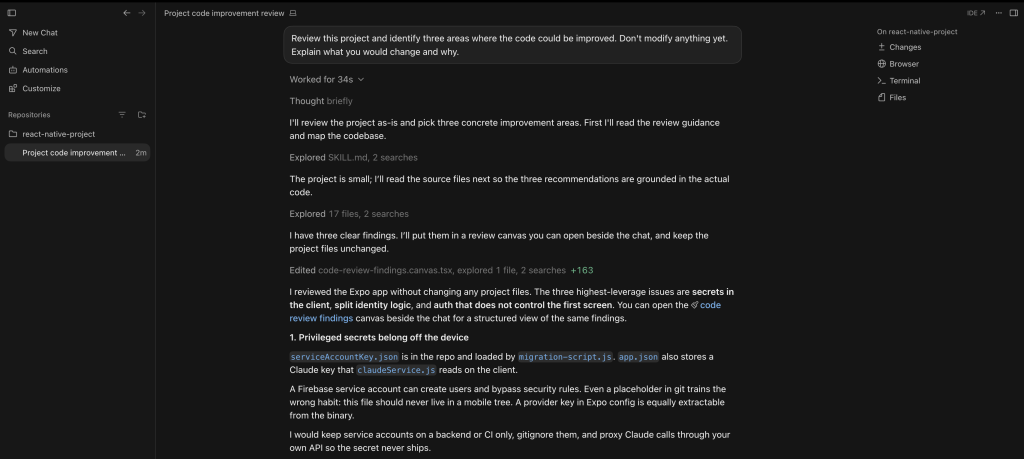
Codex is particularly useful when a development task involves more than writing a single function. In my testing, it was able to inspect the React Native project, understand how different parts of the application fit together, and return concrete recommendations without modifying the project.
That repository-level context is one of the most useful parts of the experience. Instead of manually opening several files and explaining how they relate to each other, you can give Codex a broader task and let it investigate the codebase first.
I also like the way Codex presents its findings. Rather than simply generating a block of replacement code, it can explain what the current implementation is doing, why it could be improved, what it would change, and what the potential trade-offs are. That makes it useful not only for writing code, but also for reviewing an existing project.
This becomes especially valuable for tasks such as debugging, security reviews, refactoring, and architecture discussions. The developer can decide which recommendations are worth implementing instead of blindly accepting every change suggested by the AI.
For developers who already spend most of their time in VS Code, having Codex available directly inside the editor also makes this workflow convenient. You can keep the project, code, and AI coding agent in the same environment rather than constantly switching between separate tools.
Where Open AI Codex Falls Short
The biggest limitation with Codex is the same thing that makes it powerful: the more responsibility you give an AI coding agent, the more carefully you need to review its work.
For a small coding change, using an agent to inspect the project, reason about the task, make changes, and run checks can sometimes be more effort than simply making the change yourself. The advantage becomes much clearer when the task involves multiple files or requires understanding how different parts of the application fit together.
There’s also a difference between identifying a problem and implementing the right solution. Codex can find a genuine issue in a codebase and suggest a reasonable fix, but that doesn’t automatically mean the proposed architecture is the best choice for the application. Developers still need to understand the surrounding requirements and review the changes before merging them.
Another consideration is that an agent-based workflow can make the development process feel less predictable than traditional autocomplete. When an AI is allowed to work through a larger task, it may investigate several files and produce a broader set of changes than you initially expected. That’s useful when the extra context is necessary, but it also means the developer needs to keep an eye on the scope of the task.
So I wouldn’t use Codex simply because it can automate a task. For straightforward changes, a simpler coding assistant can be faster. Codex becomes more valuable when the problem requires repository-level context, investigation, and several development steps.
Who Should Use Open AI Codex?
Codex makes the most sense for developers who want an AI coding agent that can take on more than individual code-generation tasks. It’s particularly useful for debugging, refactoring, feature development, testing, code review, and other work where the agent needs to understand the surrounding project.
It’s especially interesting if you already work in VS Code and want the AI to be part of the development environment rather than a separate tool. In my testing, Codex was able to review the React Native project without modifying it and identify issues involving security, authentication, and application structure.
If your typical workflow is mostly autocomplete, small code suggestions, or asking an AI to write an isolated function, you may not need that much agentic capability. A simpler AI coding assistant can be quicker for those tasks.
But when the task sounds more like “look through this project, figure out what’s wrong, explain the important issues, and suggest how I should improve it,” Codex becomes much more interesting.
The main appeal is therefore not simply that Codex can write code. It’s that you can give it a broader engineering problem and have it investigate the project before you decide what should actually change.
Try Codex → OpenAI Codex
Which AI Code Assistant Is Best for Different Developers?
After looking at Cursor, Claude Code, and Codex individually, I don’t think there’s a single winner for everyone. Each tool takes a slightly different approach to AI-assisted development, and the better choice depends largely on how you already work.
If you spend most of your day inside an IDE and want AI deeply integrated into the editor, Cursor is probably the most natural choice. Its AI-first approach makes it easy to move between writing code, asking questions about the project, and letting an agent work across multiple files.
Claude Code makes more sense if you’re comfortable with the terminal and frequently work on debugging, refactoring, or larger repository-level tasks. Its agent-oriented workflow can be particularly useful when the problem isn’t isolated to one file.
OpenAI Codex is a strong option if you want an AI coding agent that fits into the broader OpenAI ecosystem and can work across different development environments. It’s particularly interesting for developers who want to delegate a larger engineering task rather than simply ask for individual code snippets.
Here’s how I’d think about the three:
| If you are… | I’d consider | Why |
|---|---|---|
| Looking for an AI-first coding editor | Cursor | Deep integration with the editor and codebase |
| Comfortable with terminal-based workflows | Claude Code | Strong fit for agentic, multi-step development |
| Working on debugging and larger codebase tasks | Claude Code / Codex | Both are suited to broader engineering tasks |
| Wanting AI directly inside VS Code | Cursor / Claude Code / Codex | All three can integrate into the development environment |
| Mostly writing small functions or snippets | Cursor | Quick editor-based workflow |
| Working on larger multi-file tasks | Claude Code / Codex | Better suited to task-level delegation |
| Wanting to stay within the OpenAI ecosystem | Codex | Integrates with OpenAI’s broader coding workflow |
One thing I’d avoid is choosing a tool purely because it performs well in someone else’s benchmark. Your own development workflow matters more than a single score. A developer working primarily in VS Code may have a very different experience from someone who spends most of their day in the terminal.
The same applies to how much autonomy you actually want to give an AI. Some developers prefer to approve every change, while others are comfortable giving an agent a larger task and reviewing the result afterwards.
For me, the most important distinction isn’t which tool can generate the best code. It’s how much useful work the tool can take off my plate without creating more work during review.
The Biggest Problem With AI Code Assistants
The biggest problem with AI code assistants isn’t that they can’t write code. It’s that they can write code that looks correct.
That’s an important distinction. A generated function can be syntactically valid, follow the style of the project, and even pass a few tests while still being the wrong solution for the application.
The problem becomes more obvious when an AI coding assistant has access to an entire repository. More context generally gives the model more information to work with, but it also gives it more opportunities to make assumptions about how different parts of the application are supposed to work.
A change that looks reasonable in one file can affect authentication, navigation, API calls, database access, or another part of the application somewhere else. This is one reason I don’t think developers should treat an AI coding assistant as an autonomous replacement for code review.
Security is another area where you need to be particularly careful. An AI assistant may identify a security problem, as we saw during the project reviews in this comparison, but the developer still needs to understand the severity of the issue and decide how it should actually be fixed. Giving an AI access to a repository also means thinking carefully about what files, credentials, services, and commands it can access.
There’s also the problem of unnecessary complexity. Sometimes an AI will suggest a sophisticated abstraction when a small, straightforward change would have been better. The resulting code may look impressive while making the project harder to understand and maintain.
This is why I think the best way to use an AI code assistant is as a development partner rather than an unquestioned decision-maker. Let it investigate the codebase, explain unfamiliar code, generate alternatives, write repetitive code, and help with debugging. But keep the final architectural and engineering decisions with the developer.
The goal isn’t to accept as much AI-generated code as possible. The goal is to finish good software faster.
And sometimes the fastest solution is still to ignore the AI suggestion and write the code yourself.
So, Which AI Code Assistant Should You Use in 2026?
After comparing all three tools, I don’t think there’s one AI code assistant that is objectively the best for every developer. The right choice depends on how you write software and how much responsibility you want to give the AI.
Choose Cursor if you want an AI-first coding environment. It’s the most natural choice if you spend most of your time inside an editor and want AI closely integrated with writing, understanding, and modifying code. It’s particularly appealing for developers who want a smooth editor-based workflow without relying heavily on the terminal.
Choose Claude Code if you work comfortably with the terminal and larger codebases. Its agent-oriented approach makes it especially useful for debugging, refactoring, testing, and tasks that require investigating several parts of a repository. If you like giving an AI a problem and letting it work through the codebase, Claude Code is worth considering.
Choose OpenAI Codex if you want a coding agent that fits into the broader OpenAI ecosystem. It’s a strong option for developers who want to delegate larger engineering tasks and work with an AI agent directly from environments such as VS Code. Its ability to investigate a project before suggesting changes makes it useful beyond simple code generation.
If you’re still unsure, I’d make the decision based on your existing workflow rather than chasing whichever tool currently has the best benchmark score. Try the same real task in each tool: give it an unfamiliar project, ask it to investigate a bug, make a small feature change, or review the architecture, and then compare not just the generated code but also how much work you had to do afterwards.
The best AI code assistant is ultimately the one that saves you the most time without making code review harder.
My quick picks:
- Best AI-first editor: Cursor
- Best for terminal-oriented, agentic workflows: Claude Code
- Best OpenAI coding-agent option: Codex
- Best for everyone: There isn’t one — choose based on your workflow
Final Verdict
AI coding assistants have moved well beyond simple autocomplete. After looking at Cursor, Claude Code, and OpenAI Codex, the biggest difference isn’t how much code each tool can generate. It’s how each one fits into the way you actually develop software.
Cursor stands out if you want an AI-first editor where the assistant is closely integrated into your everyday coding workflow. Claude Code is particularly compelling for developers who are comfortable with the terminal and want an agent that can investigate larger codebases and work through multi-step problems. Codex takes a broader coding-agent approach and is a strong option if you want to bring AI-assisted development into the OpenAI ecosystem and environments such as VS Code.
But there’s an important lesson across all three: more autonomy doesn’t automatically mean better development. The ability to inspect a repository, modify multiple files, run commands, and work through a task is powerful, but it also makes developer review more important, not less.
For me, the best AI code assistant isn’t the one that generates the most code or wins a particular benchmark. It’s the one that removes repetitive work, helps me understand problems faster, and still leaves me confident about what is going into the project.
If you’re choosing one today, start with your workflow rather than the marketing. Try the tool on a real project, give it a task that requires more than writing a single function, and see how much useful work it can actually take off your plate.
AI coding assistants are becoming genuine development partners. But the developer still needs to be the one making the important engineering decisions. We’ve also looked at how artificial intelligence is reshaping different industries.